Appearance
For Seekers
Start a question
- Open Describe a challenge. Describe what you are working on in plain words: the site or business involved, the problem, and any deadline.
- Select Ask. Review the interpretation, correct mistakes, then continue; you can skip the interpretation and answer the questions yourself.
- Answer one question at a time with Next. Choose I don't know when you lack a fact. Return to skipped questions later.
- Read the initial assessment and open Open the full record to edit the full decision. See Decisions.
Use New question for another question. Recent work lets you resume an existing decision. Closing or deleting work changes your saved records; read the confirmation before proceeding.
Find and compare providers
From a reading, choose Find providers for this. You can also use Browse to search company listings and open company, product and use-case details. Review evidence and the trust label before saving a candidate. Saved solutions and comparison live under Saved.
Contact and follow up
Use the contact action on an eligible company or solution. Read and reply in My inquiries; notifications alert you to updates. An unmanaged listing may have no contact action. Saving a provider does not contact it or place an order. Record your reasoning and outcomes in a project.
Worked example: a warehouse heating pilot
Visual guide: set up your account
English screen, translated caption. No account was created and no email was sent; signed-in examples use fictional demo data. A displayed form is not proof of completed authentication, verification or membership.
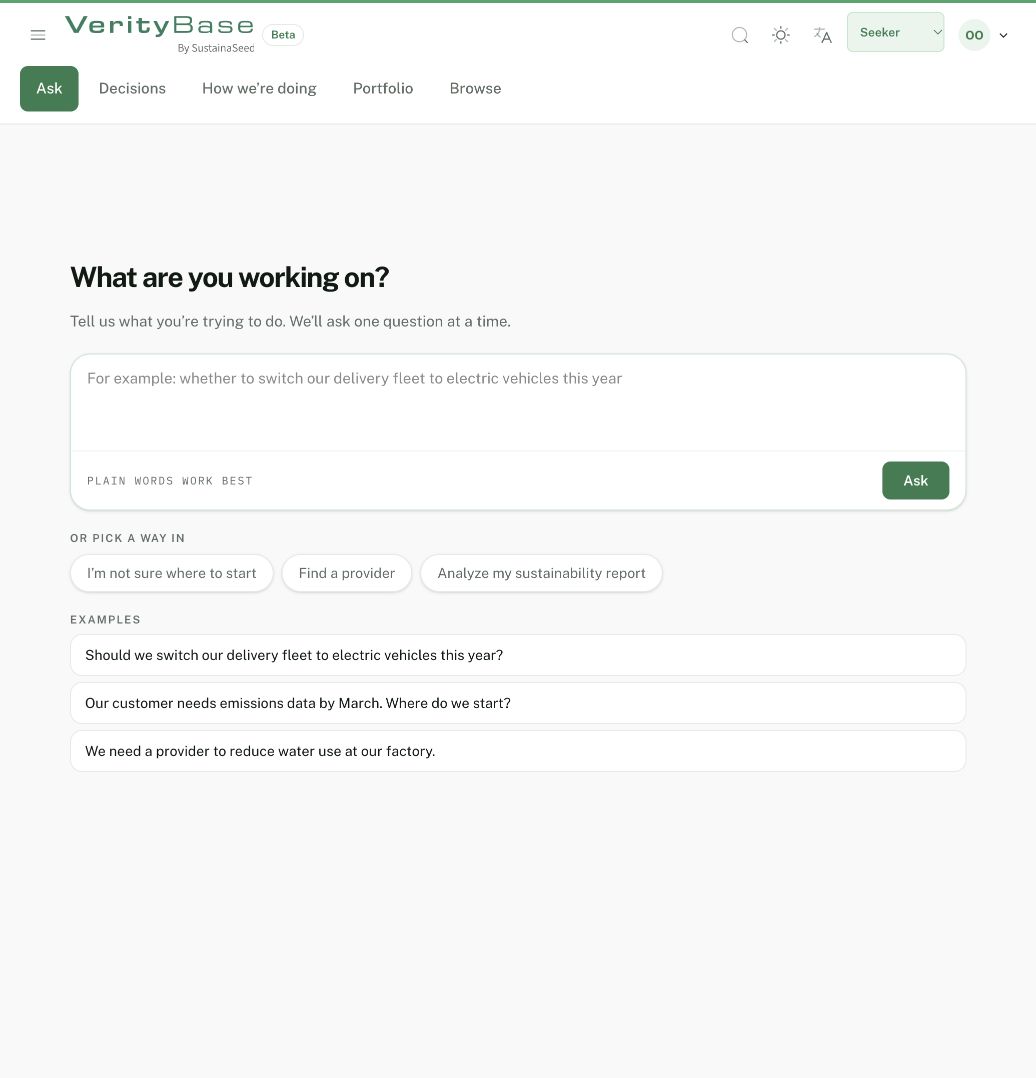
The first-question composer is empty; no decision was submitted.